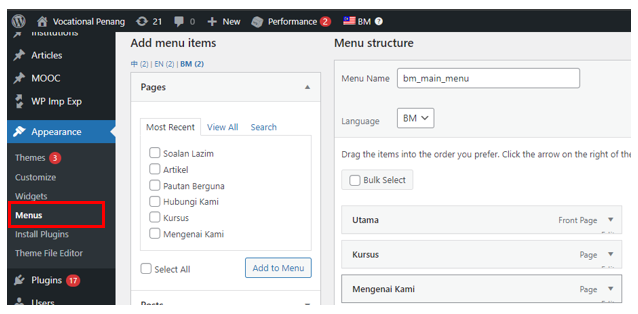
Step 1: Once you login, Go to Dashboard > Appearance > choose “Menus”
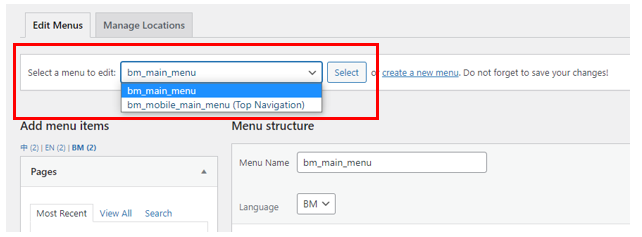
Step 2: Select the menu that you wish to edit from the drop-down list.
Step 3. Then, click the "select" button.
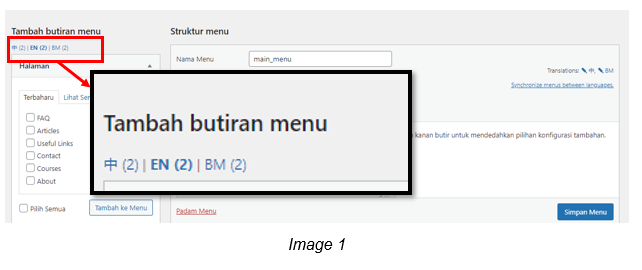
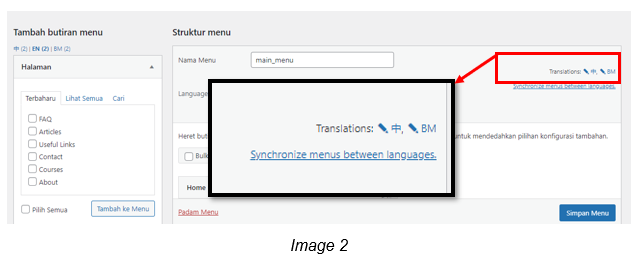
Step 4: To edit different language, you will need to choose the language under Translations.
You can select the language from these 2 sections (refer image 1 & image 2).
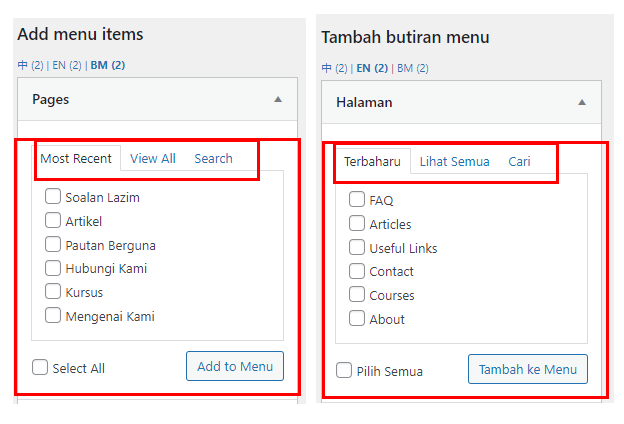
Step 5: Once you choose the language, go to “ Pages/Halaman” to add the page.
Option 1: Click the "most recent" tab under Pages
Option 2: If you can't find the pages that you wish to add, click on "view all" tab.
Step 6: Tick on the page that you wish to add.
Step 7: Click "add to menu/Tambah ke Menu”.
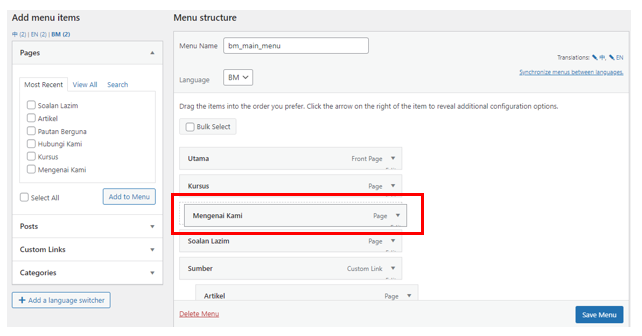
Step 8: Drag and drop the page to the desired place.
Step 9: Click "save menu" once done.
Step 10: Repeat step 4 to step 9 for other languages.
Was this article helpful?
That’s Great!
Thank you for your feedback
Sorry! We couldn't be helpful
Thank you for your feedback
Feedback sent
We appreciate your effort and will try to fix the article